
Roblox Parental Controls Guide for Singapore Parents
Learn how Roblox parental controls work in 2026, including Kids, Select, maturity ratings, safer settings, and Ottodot's verified Minimal learning games.

If your child is between 6 and 12, Roblox is probably already part of the household conversation. Maybe they ask for it after homework, maybe they play on weekends, or maybe you only hear the game names from the next room. Either way, the same parent questions come up: Who can talk to my child? What are they playing? Is this game suitable for their age?
Roblox changed its safety system in 2026, especially for users under 16. This guide explains Roblox Kids, Roblox Select, content maturity ratings, safer settings for Primary school children, and how Ottodot uses Roblox as structured, teacher-led learning rather than open-ended play.
What changed in Roblox parental controls in 2026?
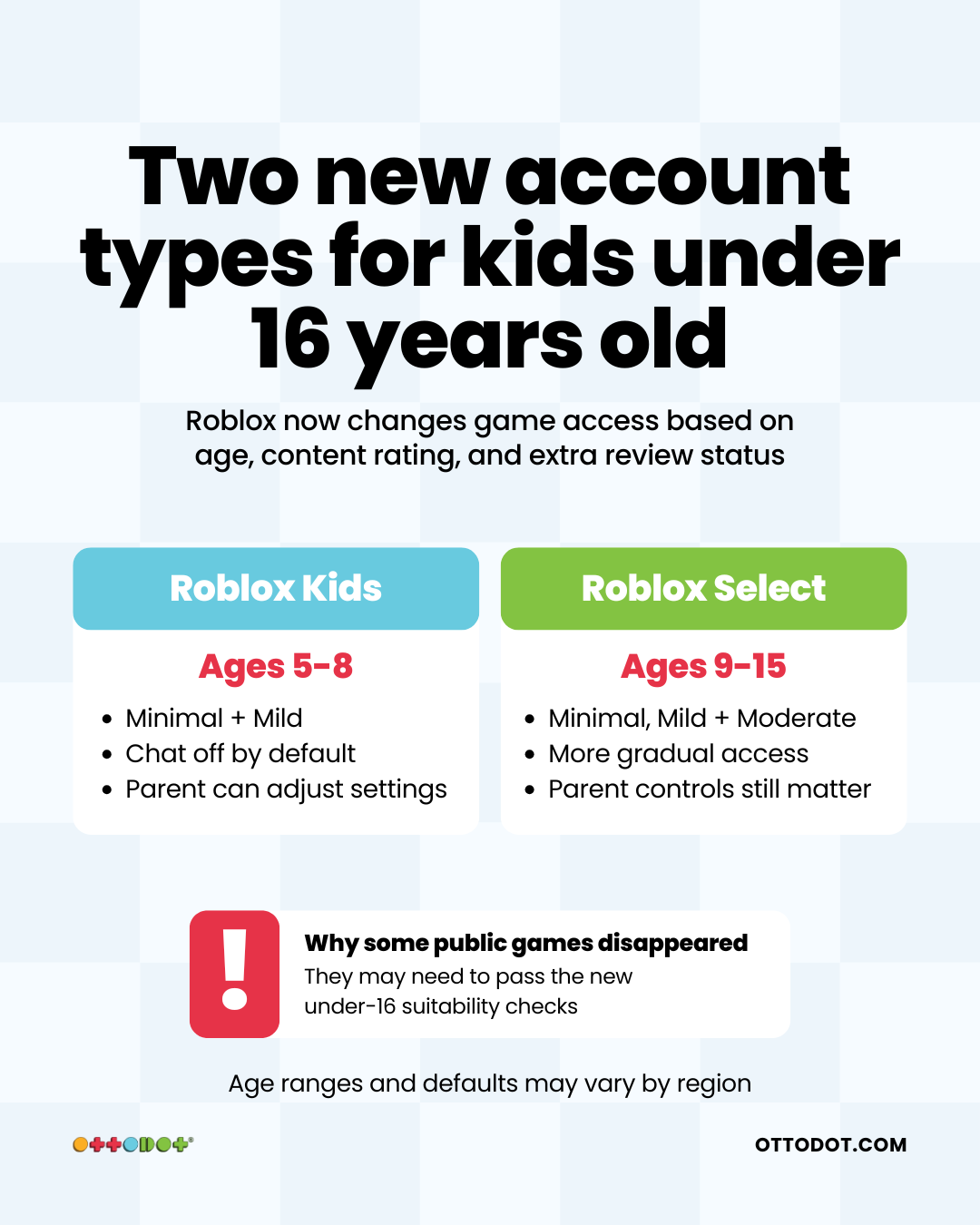
Roblox introduced two age-based account types for younger users:
Roblox Kids: for users aged 5-8.
Roblox Select: for users aged 9-15.
These accounts change what younger users can access by default. Roblox now combines age checks, content maturity labels, communication defaults, parental controls, and an additional game selection process for users under 16.
For Singapore parents, the practical effect is simple: a game that worked last month may suddenly be unavailable on a younger child's account. That does not always mean the game was flagged as unsafe. It may need to pass Roblox's newer suitability checks before it appears for Kids or Select accounts.
You can read Roblox's own update here: Roblox Kids and Select accounts.
Roblox Kids vs Roblox Select: what parents need to know
Account type | Typical age range | Content available by default | Chat default |
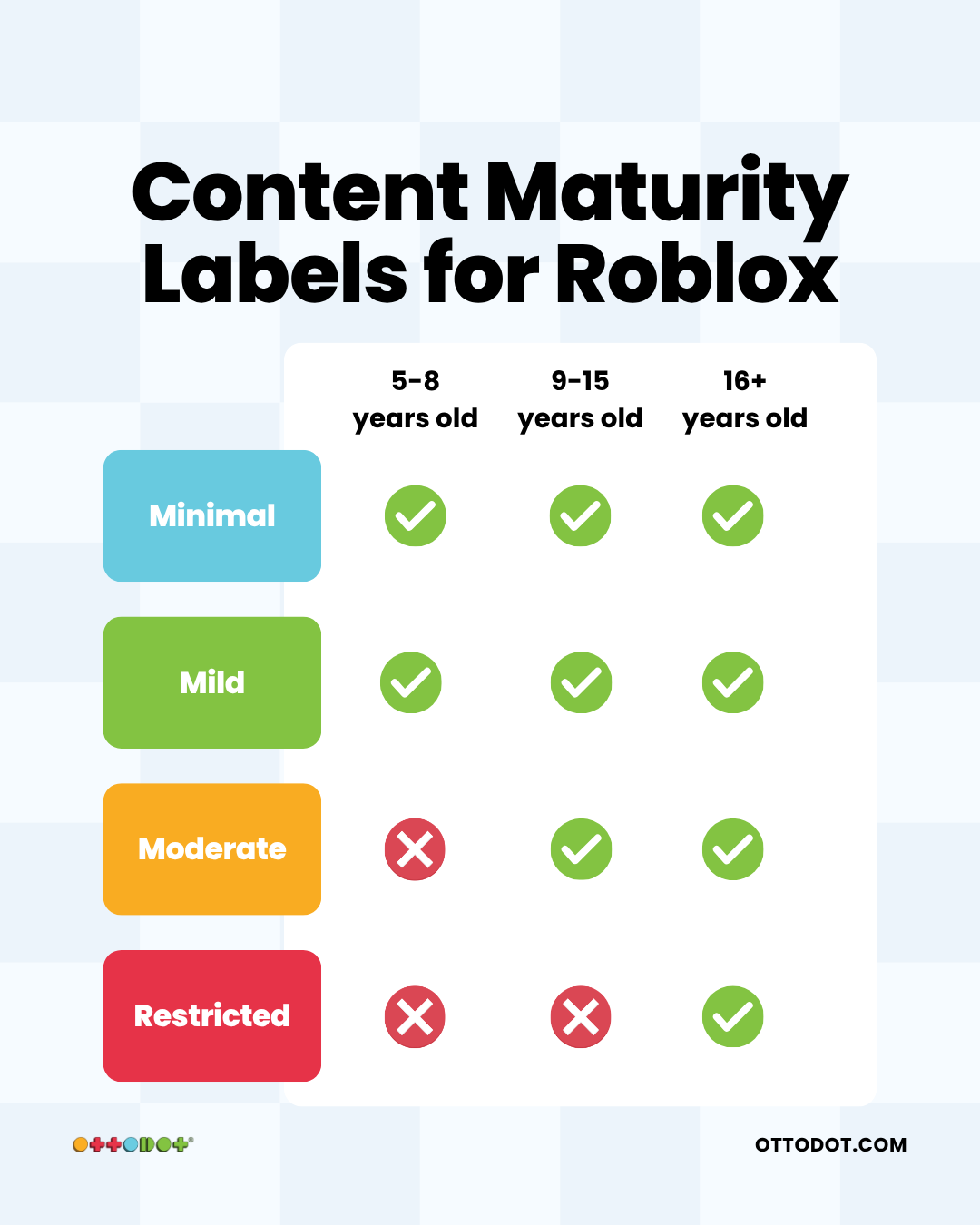
Roblox Kids | 5-8 | Games rated Minimal or Mild that pass Roblox's under-16 selection process | Chat off by default |
Roblox Select | 9-15 | Games rated Minimal, Mild, or Moderate that pass Roblox's under-16 selection process | Chat gradually introduced with safeguards, depending on age and region |
Standard Roblox | 16+ | Most rated content, except Restricted content unless eligible | Broader communication options |
Roblox notes that exact ages and features may vary by region. For most Primary school children in Singapore, the key categories are Roblox Kids and Roblox Select.
Roblox content maturity ratings, explained simply
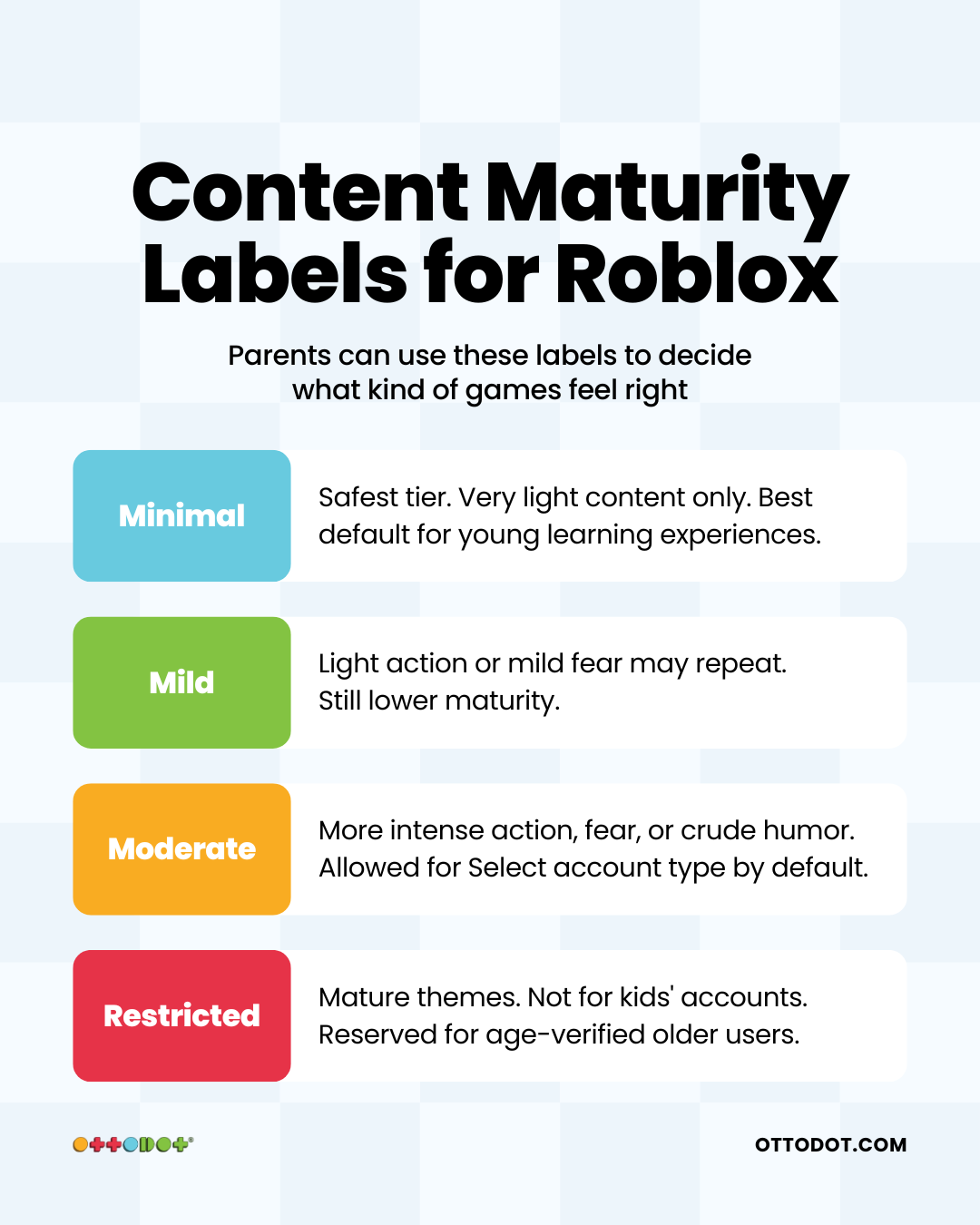
Roblox uses content maturity labels to describe what a child may encounter inside an experience. The label does not tell you whether a game is educational, high quality, or worth your child's time. It only tells you the maturity level of the content.
Rating | What it generally means | Suitable default for ages 6-12? |
Minimal | Roblox's lowest maturity label. May still contain occasional mild fear, mild violence, or light unrealistic blood. | Yes, this is the safest default. |
Mild | May include repeated mild violence, mild crude humour, or repeated mild fear. | Usually acceptable for older primary children, depending on your family rules. |
Moderate | May include stronger violence, moderate fear, light realistic blood, or similar content. | Better for older children only, with parent review. |
Restricted | Mature content, available only to eligible older users. | No. Not for primary school children. |
For children aged 6-8, Minimal is the safest default unless you have reviewed a specific game yourself. For children aged 9-12, Minimal or Mild is usually enough. Avoid Moderate as a broad default unless you are actively reviewing what they play.
Roblox's current parental controls guide explains these labels here: Parental Controls Overview.
What this means for Ottodot's Roblox learning games
Ottodot's Roblox games are built for education, not open-ended public play. In live teacher-led classes, children learn a Math or Science concept first. The Roblox mission comes after that, so the game is practising something the teacher has already taught.
In 2026, Roblox's new under-16 safety framework temporarily affected some educational games across the platform because smaller, curated experiences may need extra review before they appear for younger accounts.
Ottodot worked with Roblox's compliance team, and our Roblox educational experiences have been verified under Roblox's safest content tier: Minimal. Once your child's account is set up correctly, Ottodot games are available by default for Roblox Kids and Roblox Select accounts.
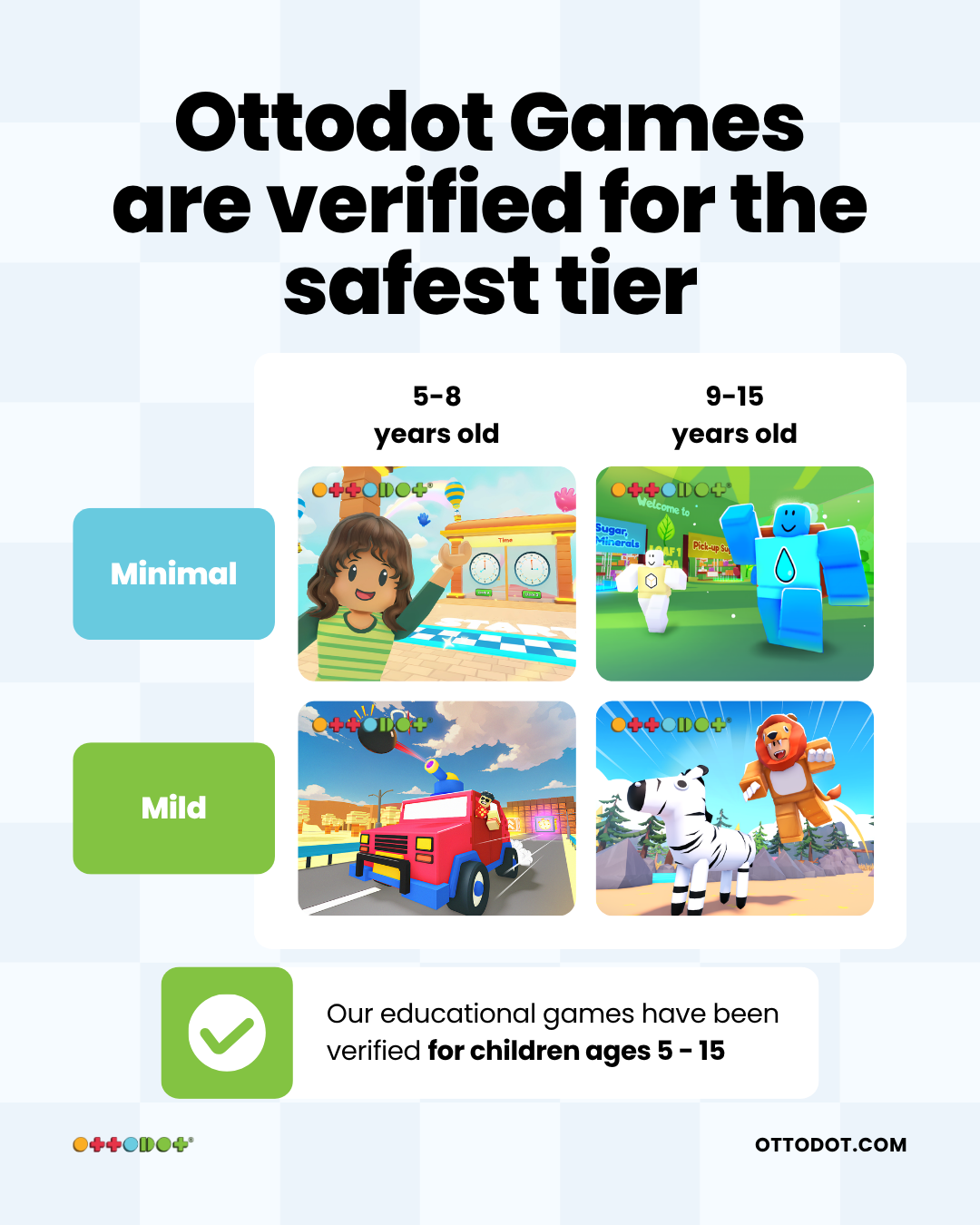
You do not need to loosen your child's content settings for Ottodot classes. If your child still cannot access an Ottodot game, check these first:
Confirm your child's date of birth is correct on Roblox.
Make sure your parent account is linked to your child's account.
Check whether a screen time limit has already been reached for the day.
If those look correct, contact Ottodot before loosening broad content settings.
How to set up Roblox parental controls
Setting this up usually takes less than 10 minutes if you have access to your email and verification method.
Step 1: Create your own Roblox parent account.
Go to roblox.com and create a free account with your own email address. Do not use your child's email address.
Step 2: Verify that you are an adult.
Roblox asks parents to verify their age using a government-issued ID or credit card. This gives you parent privileges for managing a child's account.
Step 3: Link your account to your child's account.
On your child's account, go to Settings > Parental Controls, choose Add parent or Link Parent Account, and enter your email address. You can then complete the link from your own device.
Step 4: Set content restrictions.
Go to Settings > Parental Controls > Content restrictions > Content maturity. For Primary school children, start with Minimal. Move to Mild only after reviewing what your child plays.
Step 5: Set chat and communication rules.
For children aged 6-8, keep chat off unless there is a clear reason to enable it. For children aged 9-12, keep communication limited and review their connections regularly.
Step 6: Set screen time and spending controls.
Use screen time limits to avoid daily arguments, and set a monthly spending cap if your child has access to Robux. Roblox also lets linked parents receive spending notifications.
Step 7: Review activity every few weeks.
The parent dashboard can show games played, screen time, and connections. Use it for calm check-ins, not surprise investigations.
Roblox's parent page is here: about.roblox.com/parental-controls.
Recommended Roblox settings for children aged 6-12
Age group | Content maturity | Chat and connections | Screen time |
6-8 years | Minimal | Chat off by default | 45-60 min/day |
9-10 years | Minimal, or Mild after parent review | Limited communication, review connections | 60 min/day |
11-12 years | Minimal or Mild | Limited communication, monitor direct chat | 60-90 min/day |
These are starting points. Some children need tighter boundaries because they get pulled into games intensely. Others can handle a routine well. Match the setting to the child in front of you.
Not all Roblox is the same
What surprises many Singapore parents is that "Roblox" can mean very different things. Public Roblox includes user-generated games across many genres, from obstacle courses and role-play to competitive games and social hangouts.
Ottodot's Roblox-based learning is different. Ottodot is a Singapore primary Math and Science tuition programme that uses Roblox-based practice after teacher instruction. The lesson comes first. The game reinforces the concept.
Feature | Public Roblox | Ottodot Roblox-based learning |
Purpose | Entertainment | Educational reinforcement |
Content | User-generated, varies widely | Built for the P1-P6 MOE syllabus |
Supervision | Parent controls only | Live teacher-led class environment |
Learning outcome | Not guaranteed | Tied to the lesson objective |
Social setting | Open unless restricted | Structured class setting |
Screen time quality | Recreational | Active, learning-focused |
Content maturity | Varies by game | Verified Minimal for Ottodot experiences |
In a typical Ottodot class, students attend a weekly 75-minute live lesson on Google Meet. The teacher explains the concept, checks understanding, guides practice, and then uses a Roblox mission to help students apply the same idea. Your child is not being sent off to browse public Roblox.
If you want to see the difference before joining a class, you can browse Ottodot's free Roblox learning games and compare them with the public games your child already plays.
Managing Roblox screen time during holidays and exams
A Roblox routine that works in June may not work two weeks before SA2 or PSLE. It helps to decide the rule before everyone is tired and negotiating at bedtime.
During the school holidays
Banning Roblox entirely over the holidays is usually hard to sustain. A more realistic pattern is structured time first: reading, enrichment, outdoor activity, or an Ottodot lesson in the morning, then 60-90 minutes of free Roblox in the afternoon, capped by parental controls.
During the exam period
As SA1, SA2, or PSLE approaches, screen time should usually come down:
Reduce early. Lower the Roblox limit about 3-4 weeks before exams. A gradual drop from 90 minutes to 45 minutes is easier than a sudden ban.
Keep learning-based time separate. If your child uses Roblox during an Ottodot lesson, treat that differently from recreational play. The goal is Math or Science practice, not free browsing.
Use specific limits. "Roblox after revision, until 5pm" is clearer than "don't play too much".
Review the games played. If the same game keeps causing arguments, block that specific game instead of changing every setting.
Explain the reason. Older Primary children respond better when they understand the trade-off.
Frequently asked questions
Does my child need their own Roblox account?
Yes. Children need their own Roblox account to play. As a parent, you should create a separate Roblox account for yourself and link it to your child's account. Once linked, your parental controls apply to their account.
What content maturity setting should I choose for a Primary school child?
Start with Minimal. For children aged 9-12, Mild may be acceptable if you review the games they play. Moderate is usually too broad as a default for Primary school children.
Why can my child not access a game they used to play?
If your child is under 16, the game may need to pass Roblox's newer Kids and Select selection process. It may also be blocked by your child's content maturity setting, regional rules, or your own parental controls.
Can I allow one game without opening up everything else?
Yes. Roblox's parental controls include allowed and blocked games. Use this when you trust one specific experience but do not want to raise the overall content maturity level.
If my child is in an Ottodot class on Roblox, will screen time limits affect the lesson?
Yes. If your child's daily Roblox limit has already been reached, Roblox may restrict access during class. On lesson days, check the limit before class starts.
Does Ottodot teach Math only, or Science too?
Both. Ottodot teaches Primary Math from P1 to P6 and Primary Science from P3 to P6, aligned with the MOE syllabus. Each weekly class has teacher-led concept teaching, guided questions, Roblox-based practice, and homework marked by teachers.
How Ottodot connects safe Roblox access to real learning
Once your child can access the right Roblox experiences safely, the next question is whether that screen time is doing any real learning work. This is where Ottodot is different from free browsing on Roblox.
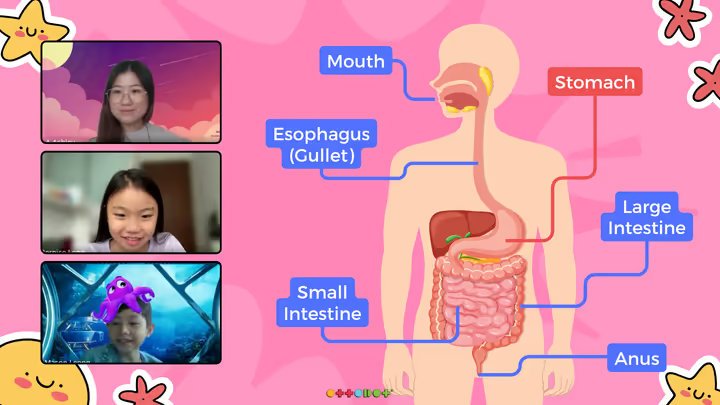
Ottodot lessons follow the same class flow shown on our homepage and diagnostic FAQ: a live teacher on Google Meet first, Roblox-based practice after the concept is taught, then homework and review so the learning carries back into written schoolwork.
Part of class | What happens | Why it matters |
10 min | Homework recap | The teacher reviews last lesson's homework and clears common questions. |
40 min | Teacher-led learning | Students learn the concept, see worked examples, and practise with guidance. |
20 min | Roblox game time | Students apply the same concept inside a custom-built Roblox world. |
5 min | Reflections | The class recaps what was learnt and what to work on next. |
For regular classes, the product goes beyond one live lesson. Students get access to 200+ MOE-aligned Math and Science games, revision guides, worksheets, weekly homework marked by teachers, and progress monitoring through class and homework attempts.
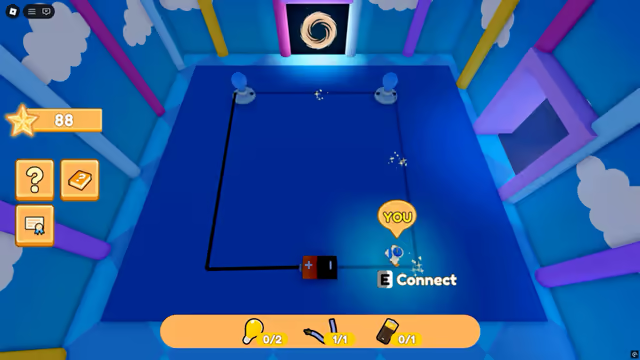
Try the full class flow before committing
Ottodot offers a $50 trial class for new students. If Math and Science both fit your child, you can try the second subject free before deciding. Trial classes are kept smaller, up to 4 students, while regular classes are capped at up to 8 students.
Best fit: children who resist worksheets, lose focus during revision, or need a more active way to practise Math and Science.
What parents should watch for: whether your child answers, participates, and can explain one thing they learnt after class.
What stays academic: MOE-aligned lesson objectives, teacher guidance, homework, and progress monitoring.
Explore classes and check if Ottodot suits your child. The quiz helps us understand your child's level, subject, and learning challenges before recommending the next step.